The orders customers send from the app, the ones you ring up at your own counter, the kitchen in between, the riders and staff who carry it out, the stock behind it and the cash at the end of the day — one system, in English and Urdu. No terminal to buy: your phone, any browser, or our free desktop app for Mac and Windows.
Free to join, no monthly fee0.1% at the till · 3% on app orders24 h usual review timeEN · اردو everywhere
What it contains
Everything inside, at a glance.
Bitely Partner in the middle, its parts around it. Tap a part to see what is inside it, and keep going: every page, its tabs and the jobs you do there. Each one opens its step-by-step guide, in English or Urdu.
Restaurants, home kitchens, bakeries, small shops and street stalls are all welcome. Register from the app or the web — about five minutes — and a person checks every listing before it goes live.
01
Add your details
Name, type of business, cuisines, phone and your exact spot, dropped on a map you drag into place. Choose delivery, takeaway, dine-in — or any mix.
02
Photos & menu
Logo, cover and gallery. Photograph a printed menu and its categories, dishes and prices fill themselves in — you check them before saving.
03
Go live, then run it
We review the listing, usually within 24 hours, and tell you when you are live. Once live, your name, type and address are locked so customers can trust them — ask us to change them.
02 · Orders from the app
The customers we bring you, on one board.
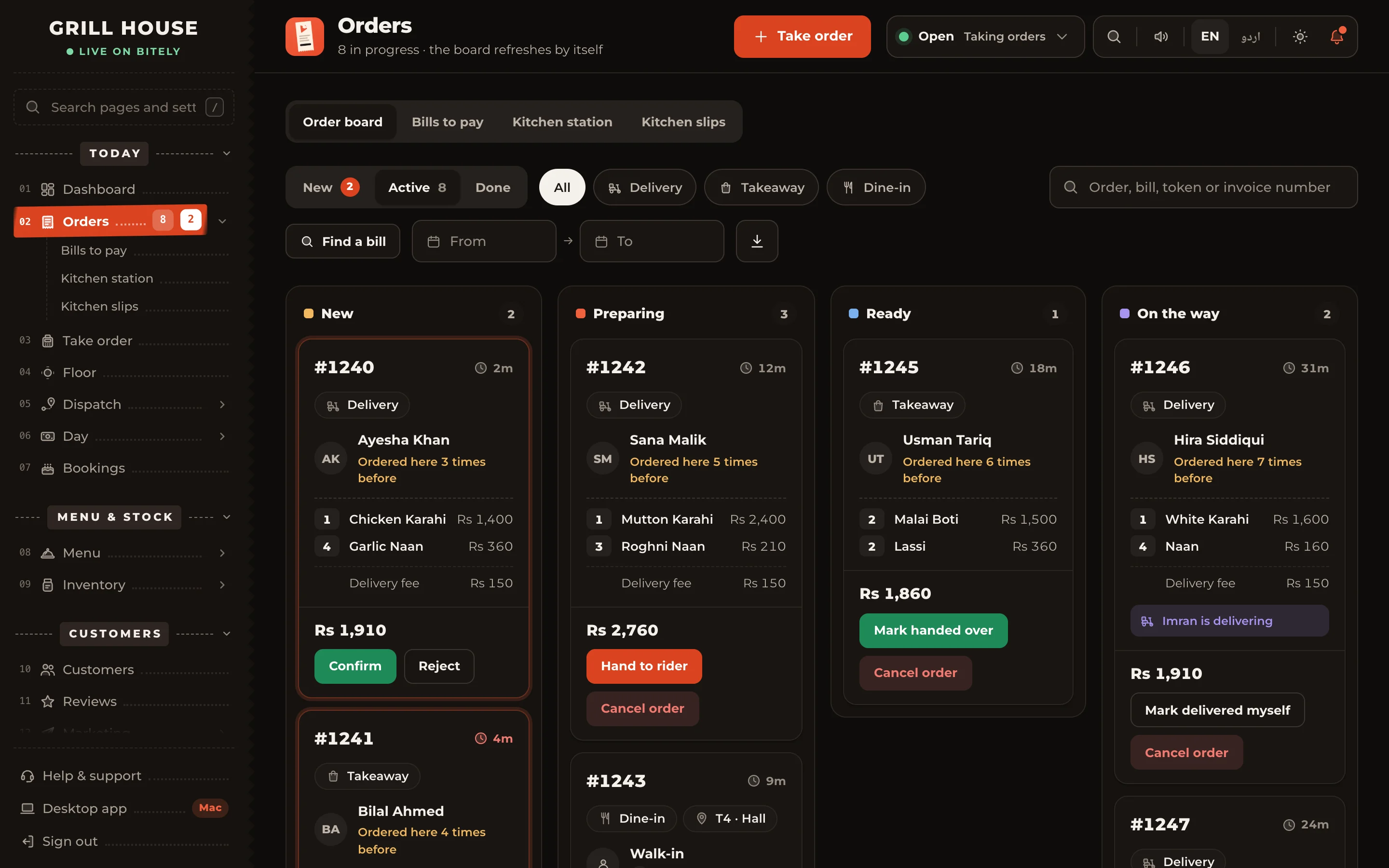
People watch a reel of your food and order it. Delivery and takeaway orders arrive on a live board with a sound and a notification — on your phone, in the browser and on the counter computer at once.
The live order board — app orders and counter tickets together, each with its next step.
Live board
New, preparing, ready, on the way
Accept or decline each order and move it along; the customer sees every step and a time estimate. A clock on each ticket shows how long it has waited.
SoundNotificationsOrder history
Less tapping
Auto-confirm regulars
Switch it on and customers who have ordered from you before skip the Confirm step: an order for now goes straight to the kitchen, a scheduled one is confirmed for its time.
OptionalRegulars only
When it is busy
Busy mode and sold out
Pause new app orders for a while without going offline, and mark a dish sold out in one tap — it comes back when you say so.
PauseSold out
Order ahead
Scheduled orders
Customers can order for a later time inside your opening hours. It waits on the board and comes up when it is time to cook.
Later todayYour hours
Changes
Changes and cancellations, fairly
A customer can change an order until you accept it. You can cancel an accepted order with a reason when you must. If one runs very late — 90 minutes cooking or 60 on the road — you are warned and the customer may cancel.
ReasonsLate warnings
Getting paid
Paid to you, not to us
Customers pay you directly — cash at the door or the counter, or a transfer into your own account, with the rider photographing the receipt. Bitely never holds your money. Set your delivery fee flat, by distance or free, and your delivery radius.
CashTransferDelivery fee
03 · The counter till
A full point of sale, no terminal to buy.
Ring up walk-ins on the same menu, on the same board as your app orders. Every shop has the till — there is nothing to switch on.
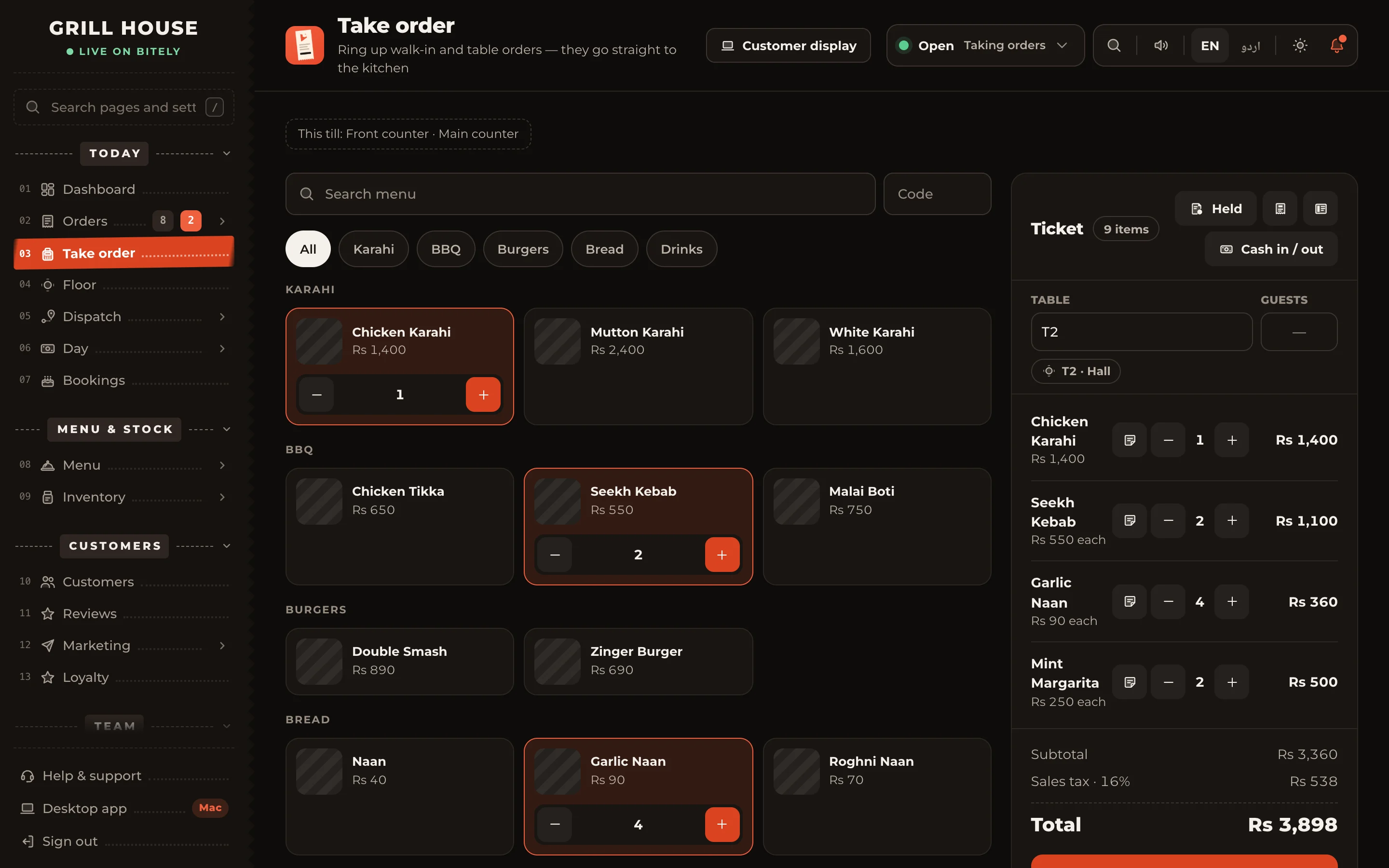
Take order — tap dishes, pick the table, send it to the kitchen. Keyboard shortcuts for every step.
Take order
Dine-in, takeaway, delivery
Priced from your menu with your deals and promotions. Notes and left-outs ("no onions") go to the kitchen; dishes with an open price take the price you type.
DealsNotesOpen price
Floor
Tables, areas and rounds
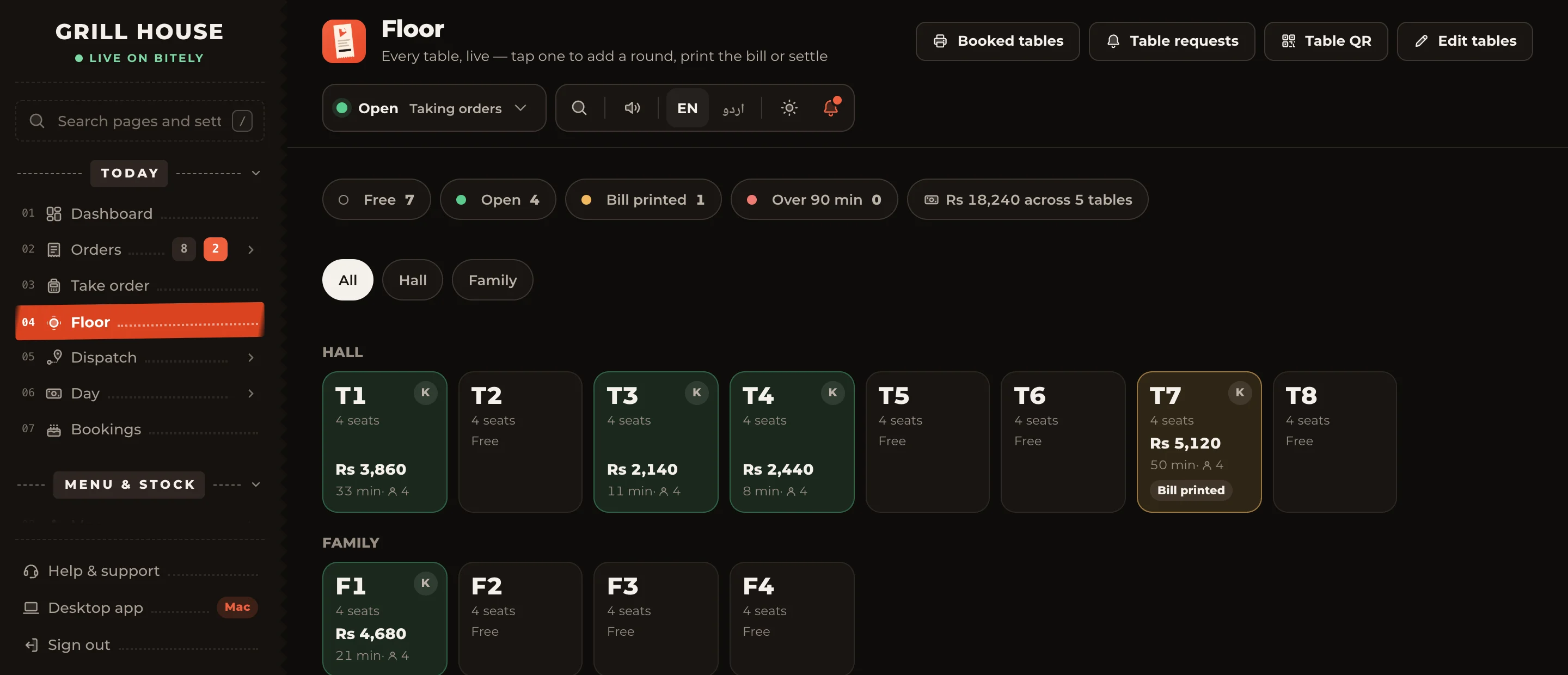
Your halls and areas, each with its tables. Add rounds to an open bill, move a party to another table or merge two — one open bill per table, always.
Floor planMoveMerge
Paying
Bills to pay, and find any bill
A queue of bills waiting to be paid, how long each has waited and what is on it. Find any past bill by its bill, token, invoice or delivery number, or the customer's name or phone — and print it again.
Bills to payFind a billReprint
Settle
Cash, card machine, transfer, QR
Split a bill across any mix of payments. Show your own payment QR for wallets; you tick it Received once the money is in — nothing confirms itself. Sales tax, rounding and service charge are worked out for you.
SplitPayment QRSales tax
Receipts
Paper, WhatsApp or a link
Receipts printed in English or Urdu with your own lines, or sent by WhatsApp or as a link. Guests can rate their visit on the receipt page, and you can reply.
English · UrduE-receiptsFeedback
Second screen
Customer display
A screen facing the customer shows the bill as it is rung up and what is left to pay — and never their name or number.
Desktop appAny second screen
No internet
Keeps working offline
If the connection drops, keep ringing up. Sales are kept on the computer with a local number, slips still print, and everything is sent — in order, never twice — when you are back online.
Offline salesSafe resend
Other apps
Delivery apps, on your Z
Orders from foodpanda and other delivery apps are rung up at the till with their reference number, so your day's report holds every sale. Bitely takes nothing on them.
foodpandaOne report
At the table
Table QR ordering
A QR code on each table: guests scan it, see your menu and send what they want — no app, no account. Nothing reaches the kitchen until a member of staff takes it.
No app neededStaff approve
Events
Functions and advances
Book a wedding, a dinner or an office party with its date, guests and menu, and take advances against it. An advance is never counted as a sale until the bill is rung up.
BookingsAdvancesRefunds
Mistakes
Hold, take off, void — with a reason
Park a bill and come back to it. Until a bill is paid, a manager can take off a dish the kitchen already has or void the bill; each needs a typed reason and goes into the activity log. A paid bill is final. A closed day never changes.
Held billsReasonsActivity log
Phone orders
Counter delivery and dispatch
Take a delivery order over the phone and send it with your own rider. Delivery numbers, a dispatch board of what is out and with whom, and your vehicles and their running costs.
Dispatch boardVehicles
The floor — every table live: what it owes, how long it has been open, and who is waiting to pay.
04 · The kitchen
Every station gets only its own items.
Split the menu between a grill, a tandoor and a drinks counter. When an order starts cooking — from the app or the counter — each station hears about exactly what it has to make.
Kitchen units
Slips that print themselves
Each station's printer gets a slip with only its dishes, the table and the notes; the counter can get the whole order too. Any printer the computer can use, including 80 mm and 58 mm thermal printers.
Auto-printPer stationReprint
Ticket numbers
Kitchen tickets, numbered
Every ticket gets a number for the day, so the kitchen and the counter talk about the same thing. Reprints are counted, and you can see which tickets have not printed.
KOT numbersNot printed yet
No paper
Kitchen screens
Prefer a screen to paper? Pair any tablet as a kitchen screen with a code: tickets appear on it, and a tap marks each one done. It never shows the customer's phone or address.
Any tabletTap to bump
The pass
A pass screen for the hand-off
The person at the pass sees what is ready for each table and marks it served, so nothing waits under the lamp.
ReadyServed
Print styles
English or Urdu on paper
Choose the layout and language for slips and receipts, per printer — Urdu printed properly, not as broken letters.
Englishاردو
Peace of mind
Told when printing stops
If the printing computer goes quiet, the dashboard warns you before an order goes unnoticed.
Printer alerts
05 · Menu, offers & stock
From the menu card to the store room.
One menu feeds the app, the counter, the kitchen and the stock count — change it once and it changes everywhere.
Menu
Sizes, deals and choices
Categories, dishes with sizes, deals where the customer picks ("any two pizzas"), item codes and a tax rule per dish. Fill a whole menu from a photo of your printed one.
Menu scanDealsSizes
Offers
Promotions that behave
Percent or amount off, inside a time window, for app orders only or in the shop too, for everyone or only your regulars. They never stack — the biggest one applies — and you are warned when two overlap.
Time windowsApp or shopRegulars
Hours
Opening hours, past midnight
Hours for each day, including the ones that run past midnight. Customers can only order while you are open, or schedule for when you will be.
Per dayLate nights
Inventory
Ingredients and recipes
Give each dish its recipe and stock is taken off as it sells. Low-stock alerts warn you in time — and nothing is marked sold out behind your back.
RecipesAuto-deductAlerts
Stores
Stores, suppliers, purchase orders
A main store and smaller ones for the kitchen or the bar, transfers between them, your suppliers and returns to them, and purchase orders received in one go.
StoresSuppliersPurchase orders
Charges
Charges you decide
Your delivery fee and radius, a service charge per dining area or hall, and your own terms and conditions built from a short questionnaire.
Delivery feeService chargeYour terms
06 · Riders & staff
Your people, each with their own job.
Invite your own riders and staff by the email of their Bitely account. They accept in the app, and each sees only what their role allows. Bitely does not employ riders or staff and takes no cut of what you pay them.
Deliver to the pinCustomer drop-off
CallDelivered
Rider · ڈیلیوریز
Navigate. Hand over. Done.
Navigation to the pin
Turn-by-turn to the customer's drop-off, with their contact on the order.
Delivered unlocks nearby
Proof of delivery only opens near the address, not from across town.
Could-not-deliver, recorded
A call-first waiting period, with the reason written onto the order.
Order chat that clears itself
The thread with the customer disappears once delivery completes.
Cash in hand, counted
A running total for each restaurant. Paid by transfer? Add a photo of the receipt. You are notified whenever the owner records a handover.
CounterDine-in
T1T2T3T4T5T6T7T8
Chicken karahi× 2
Garlic naan× 1
Mint raita× 1
Rung up by bearer · Table 4Send to kitchen
Bearer · Counter
A till in your pocket.
Priced automatically
Ring up dine-in and takeaway from the same menu the kitchen cooks from. No separate POS terminal to buy.
Your tables, today
From table number to total, right through to marking them served.
Every sale is signed
The owner sees who rang up each ticket, and the name is on the receipt.
Slips print in the kitchen
Send an order and each kitchen station's printer gets its own slip, with the table on it.
Counter only, by design
Staff can never open, reprice or cancel an app order, and handle the menu or the cash only if you allow it.
Roles ذمہ داریاں
Every role starts from sensible defaults. You can switch any single ability on or off for a person, set how much discount they may give, and keep a bearer to their own tables.
Ownerمالک
Everything: the listing, menu, money settings, staff and every report. Signs in with an emailed code every time.
Managerمنیجر
Everything at the counter, including voiding unpaid bills, any discount, the menu, reports, the activity log, attendance and functions.
Cashierکیشیئر
A bearer's work, plus discounts up to 10%, cash in and out, opening and closing the day, tables and open prices.
Bearerبیرا
Takes orders at their own tables, sends them to the kitchen, prints the bill and takes payment. No discounts unless you allow them.
Store keeperاسٹور کیپر
Stock only: ingredients, stores, suppliers and purchase orders.
Viewerصرف دیکھنے والا
The dashboard, reports, stock and the activity log — read only. For a partner or an accountant.
Riderرائیڈر
Delivery offers to accept or decline, navigation, proof of delivery and the cash they hold for you.
One business role per account. An account can always order food, and on top of that it holds one business role: an owner, a rider, or one staff role. The same role at more than one shop is fine — a rider for two kitchens, a manager of two branches.
One computer, many hands
Counter PIN and lock
Staff switch in at the shared counter computer with their own PIN, and lock it when they step away. Every sale carries the name of the person who rang it up.
Own PINLock
Who did what
Staff activity log
Discounts, voids, reopened bills, cash in and out, day closes — each with who, when and why. Nobody can edit or delete it.
Read onlyReasons
On duty
Attendance and duty rota
Staff clock in at the shop — checked by their distance from it, without storing where they were. Leave, a weekly duty rota and who is on duty right now.
Clock inLeaveRota
Records
Employee records and staff meals
Keep a record for everyone who works for you — even those without a Bitely account — and link it to their login. Staff meals are written down by name.
EmployeesStaff meals
Rider cash
Know what every rider holds
Cash in hand per rider, delivery by delivery. Record each handover with what you were actually given, check transfers against the receipt photo, and the rider is told every time.
Cash in handHandovers
Many drops
Delivery offers and routes
Offer a delivery to a rider, who accepts or declines with a reason. Several drops at once? One route through all of them, in the best order.
OffersDeliver all
07 · Customers
Know your regulars by name.
The app finds you new customers. These help you keep them.
App customers
Every customer's history
Who has ordered, how often and what they have spent with you — with their Bitely profile one tap away.
CustomersHistory
Walk-ins
Customer book and member cards
Save walk-in customers at the counter so the next bill finds them by phone number. Give members a standing discount on top of your offers.
Customer bookMembers
Loyalty
Points and offers for regulars
Customers earn a point for every Rs 100 they spend with you, in the app or on a till bill you add them to. Offers you keep for regulars unlock at the points you choose, and we tell them when one opens.
PointsLocked offers
Reviews
Reviews, and your reply
Only customers who ordered can review: one star rating, quick reasons and a thumb for each dish. Reply in public, and learn which dishes people come back for.
Verified ordersReplies
Posts
Your reels, and theirs
Post photos and short videos of your food; name the dish and viewers can order it straight from the post. Customers' posts that tag you show under Tagged — report one that isn't really you.
PostsTaggedOrder button
Help
Support from a person
Open a support thread from the dashboard and a person answers it. Notifications keep orders, reviews and team changes in one place.
SupportNotifications
08 · Cash & reports
Close the day knowing it adds up.
Every rupee is booked once, to the right day, the right drawer and the right person.
Today
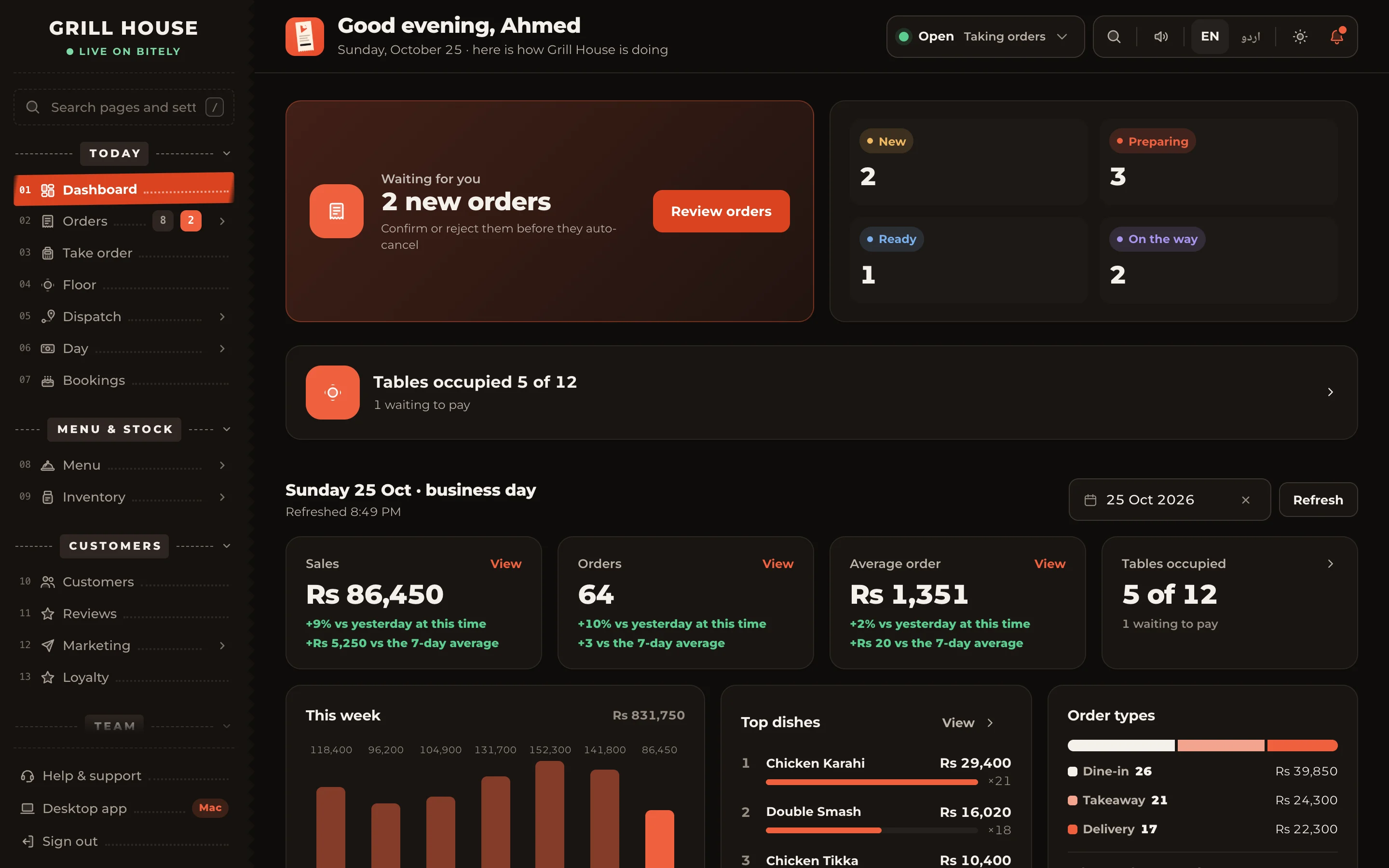
A live dashboard
Orders waiting, cooking and on the way, today's takings, the dishes that are selling and who is on duty — on the web and in the app.
LiveStaff on duty
The business day
X and Z reports, day close
Open the day, check an X report at any time and close it with a Z. A day can run past midnight to your own cut-off, and earlier open days are shown until they are closed.
X reportZ reportCut-off
Drawers
Shifts and cash counters
Each cashier's shift with its float, each counter's drawer, expected against counted cash — and the drawers add up to the shop.
ShiftsCountersFloat
Petty cash
Cash in and out, expenses
Money taken from or put into the drawer, with a reason and your own expense types — so the count at night has no surprises.
Cash in/outExpense types
Knowing more
Analytics and reports
Views, orders and revenue against the period before, best sellers, busy hours, and sales by dish, staff and payment method — with CSV downloads.
TrendsDishesCSV
The bottom line
Profit and loss
Sales, the cost of what you sold, your expenses and what is left. Where a cost is unknown it says so, instead of guessing.
P&LHonest gaps
For your accountant
A month in one file
Download a whole month — sales, payments, tax, cash and more — as a single ZIP of spreadsheets that match your reports.
Monthly ZIPCSV
09 · Where it runs
On whatever you already have.
One account, one shop, the same data everywhere — in English or Urdu, with a proper right-to-left layout.
Any browser
The web dashboard
Everything on this page at business.bitely.store — on a laptop, a counter PC or a tablet. Five looks to choose from, and a search that finds any page or setting.
WebEnglish · Urdu
Counter computer
Bitely Partner for Mac & Windows
The dashboard in its own window, with kitchen printing built in and the customer display on a second screen. Free.
MacWindowsPrinting
Your phone
The Bitely app
Your orders, menu, riders, staff and counter in the same app you post from — on Android and iPhone.
AndroidiPhone
No internet at the shop
Bitely Partner Offline
The till, kitchen printing, tables, staff with their own PINs, attendance, stock, payroll and reports on one Windows computer or Mac — no account needed. It is paid: connect once to ask, Bitely turns it on after payment, and from then on it works without internet — it only needs to go online once every 45 days to stay turned on. Everything stays on that computer, backed up every day. App orders, riders and phones need Bitely online.
Listing is free, with no monthly fee and nothing up front. Bitely charges 0.1% of the food and drinks you sell at your own till and, once there are at least 1,000 people on the app, 3% of the food on orders we bring you — never on sales tax or your delivery fee. Both are worked out automatically from what your till already records: you never report your sales to us.
One fee for the whole POS — till, kitchen, floor, stock and reports — and for the apps your riders, bearers, cashiers, cooks and every employee use: no charge per person or per device
Invoiced at the end of each month, for the sales you actually made
Nothing charged yet — each starts on an emailed date: 30 days ahead for the 0.1%, 14 for the 3%
Figures published before they take effect, never a backdated bill
No lock-in, and your customers' cash never passes through us
Your sales records stay yours — never sold or shared
Something else? The support page has more, and a person answers.
Restaurants, home kitchens, bakeries, small shops and street vendors, anywhere in Pakistan. Registering is free and takes about five minutes: details and location, photos and menu, then submit. A person reviews it, usually within 24 hours, and you are told when you go live.
No. Everything runs on a phone, any browser or the free desktop app for Mac and Windows. To print kitchen slips and receipts, plug any printer — including the usual 80 mm or 58 mm thermal printers — into the computer running the desktop app. A tablet can be a kitchen screen.
You already have it. Every shop gets the till — tables, settling bills, sales tax, the day close, staff roles and the rest — with nothing to switch on or ask for. Open Take order in the dashboard, the desktop app or the Bitely Partner app.
The counter keeps going. Sales you ring up are kept on that computer with a local number, kitchen slips still print from the desktop app, and everything is sent when the connection is back — in order, and never twice. App orders need the internet, because the customer does. No internet at the shop at all? Bitely Partner Offline runs the whole counter on one Windows computer or Mac.
For delivery, yes — invite your riders by email and offer them orders. If you would rather not deliver, run takeaway or dine-in only and let customers come to you.
In the same role, yes — a rider can ride for two kitchens, a manager can run two branches. But an account holds only one business role: someone with their own business can't also be your bearer, and your rider can't also be your cashier. Anyone can still order food with that account.
Only if their role allows it, and you can change any ability for any person. Discounts have a limit per person, voids and reopened bills need a reason, and everything goes into an activity log nobody can edit.
No. Customers pay you directly — cash, a transfer into your account, or your own payment QR. There is no card payment, wallet or payout inside Bitely. Once fees begin, we invoice you monthly: 0.1% of your till sales and 3% of the app orders we brought you.
While your listing waits for review, yes. Once it is live, the name, type of business, address and map pin are locked so customers can trust them — ask us from Support and we will change them for you.
Start today
Your shop, on Bitely.
Free to register and no monthly fee — just 0.1% of your till sales and 3% of the app orders we bring you, each from a date we email you.
 Bitely